> For the complete documentation index, see [llms.txt](https://wiki.zeronest.pl/llms.txt). Markdown versions of documentation pages are available by appending `.md` to page URLs; this page is available as [Markdown](https://wiki.zeronest.pl/obslugiwane-urzadzenia/falowniki/falowniki-deye/sun-3k-12k-sg05lp3-eu-sm2.md).

# SUN-3k-12K-SG05LP3-EU-SM2

### Lista obsługiwanych urządzeń:

| Model falownika        |
| ---------------------- |
| SUN-3K-SG05LP3-EU-SM2  |
| SUN-4K-SG05LP3-EU-SM2  |
| SUN-5K-SG05LP3-EU-SM2  |
| SUN-6K-SG05LP3-EU-SM2  |
| SUN-8K-SG05LP3-EU-SM2  |
| SUN-10K-SG05LP3-EU-SM2 |
| SUN-12K-SG05LP3-EU-SM2 |

#### Parametry Modbus

| Parametr | Wartość |
| -------- | ------- |
| baudrate | 9600    |
| slave ID | 1       |
| format   | 8n1     |

#### RS485

| DIN200 | Inwerter                        |
| ------ | ------------------------------- |
| A      | Modbus Port PIN 2 SUNSPE-485\_A |
| GND    | -                               |
| B      | Modbus Port PIN 1 SUNSPE-485\_B |

### Podłączenie przewodu komunikacyjnego

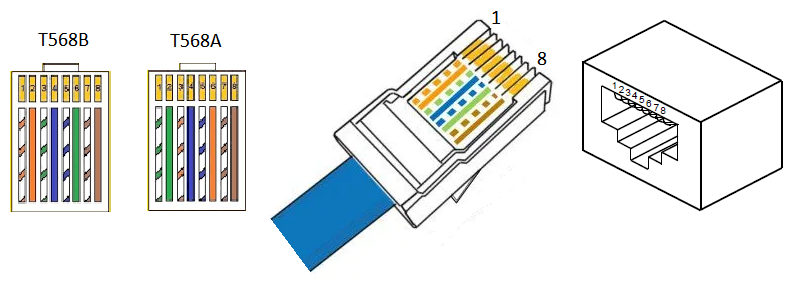
Do poprawnej komunikacji falownika z modemem DIN200 należy **podłączyć przewód RJ45 do portu Modbus (6)** falownika Deye SUN-SG05LP3. Port Modbus jest pokazany na poniższym rysunku zaznaczony numerem 6. Drugi koniec przewodu należy podłączyć do modemu **DIN200:** **PIN 2 <-> A** (standardowo żyła pomarańczowa) oraz **PIN 1 <-> B** (standardowo żyła biało-pomarańczowa). Poniżej znajduje się rysunek z dokumentacji technicznej dla konkretnego modelu falownika Deye, przedstawiający porty RJ45.

<figure><img src="/files/705zhoeSdSxpfLTEA4Fh" alt=""><figcaption></figcaption></figure>

<figure><img src="/files/PUDAcjBS6GIMUYg9MWrA" alt=""><figcaption></figcaption></figure>

<figure><img src="/files/ct0XpA6nLWV3BvIfsbDy" alt=""><figcaption></figcaption></figure>

<p align="center">Rysunek 1. Opis interfejsów inwertera Deye.</p>

<figure><img src="/files/UbHEKFGc1iO2oNaqLEb4" alt=""><figcaption></figcaption></figure>

<p align="center">Rysunek 2. Opis portu Modbus (6) inwertera Deye do podłączenia zewnętrznego EMS.</p>

<figure><img src="/files/qQvmEdC5EbKg9Rf8ojxF" alt=""><figcaption></figcaption></figure>

<p align="center">Rysunek 3. Schemat pinów przewodu RJ45.</p>

### Podłączenie przekładników prądowych (CT)

Na poniższym schemacie jest przedstawiony sposób podłączenia przekładników prądowych (CT) do inwertera.

<figure><img src="/files/bqswduOALfXRSXVY1Yi5" alt=""><figcaption></figcaption></figure>

<p align="center">Rysunek 4. Listwa zaciskowa.</p>

<figure><img src="/files/7ywMdOHzYi5vK2dZuzLM" alt=""><figcaption></figcaption></figure>

<p align="center">Rysunek 5. Podłączenie przekładników prądowych (CT).</p>

### Konfiguracja inwertera

Przejdź do „Ekran główny” >> „Ustawienia systemu” >> „Funkcje zaawansowane”.

**Ustaw:**

1. "Master"
2. Modbus SN: 01
3. Baud Rate: 9600

<figure><img src="/files/Kv5c22NDE5kpoEVGaeGW" alt=""><figcaption></figcaption></figure>

<p align="center">Rysunek 6. Prawidłowe parametry Modbus inwertera.</p>

{% hint style="info" %}
Potrzebujesz wsparcia? Zajrzyj do [najczęściej zadawanych pytań](/faq/najczesciej-zadawane-pytania.md) lub skontaktuj się z [nami](/faq/kontakt.md).
{% endhint %}


---

# Agent Instructions
This documentation is published with GitBook. GitBook is the documentation platform designed so that both humans and AI agents can read, navigate, and reason over technical content effectively. Learn more at gitbook.com.

## Querying This Documentation
If you need additional information that is not directly available in this page, you can query the documentation dynamically by asking a question.

Perform an HTTP GET request on the current page URL with the `ask` query parameter, and the optional `goal` query parameter:

```
GET https://wiki.zeronest.pl/obslugiwane-urzadzenia/falowniki/falowniki-deye/sun-3k-12k-sg05lp3-eu-sm2.md?ask=<question>&goal=<endgoal>
```

`ask` is the immediate question: it should be specific, self-contained, and written in natural language.
`goal` is optional and describes the broader end goal you are ultimately trying to accomplish on behalf of the user. GitBook uses it to tailor the answer towards what is most useful for that goal.

The response will contain a direct answer to the question and relevant excerpts and sources from the documentation.

Use this mechanism when the answer is not explicitly present in the current page, you need clarification or additional context, or you want to retrieve related documentation sections.